
OscarWatch Logbook
Log the contact before the bird drops below the horizon.
A quick satellite logbook that sits beside the map during the pass. The satellite, mode and frequencies you are tracking go into every contact automatically, so you only type the call. When the pass is over, export ADIF for your main log or let it upload to Cloudlog.
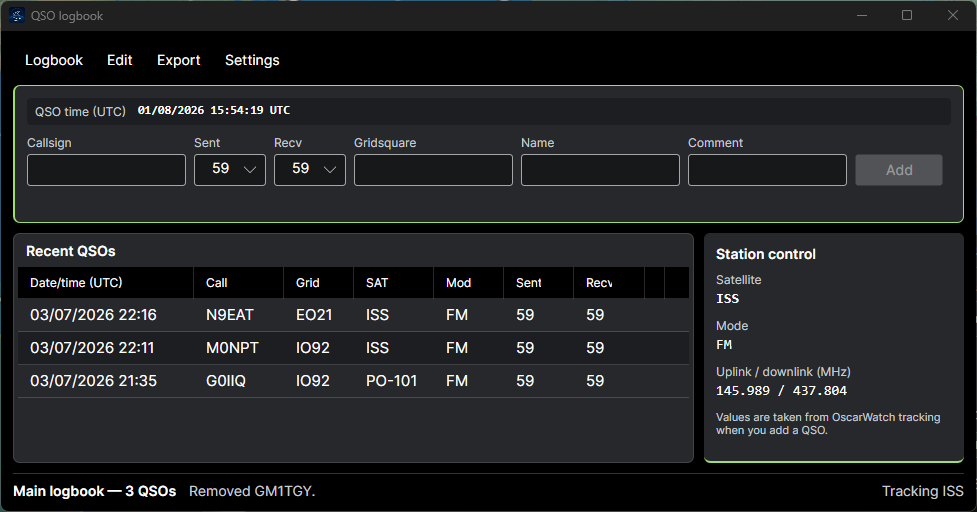
Made for logging on a pass
Satellite passes are short. The logbook keeps typing to a minimum and fills in what OscarWatch Tracker already knows.
The satellite is filled in
Click a satellite on the map or in the pass list. Its name, mode, uplink and downlink frequencies are saved with every contact you add.
Fast entry
Type the call and press Enter. Focus jumps back to the callsign box for the next one, Alt+W clears the fields, and RST starts at a sensible default for the mode.
UTC on every contact
Each contact is timestamped in UTC the moment you press Add, with a live clock showing exactly what will be recorded.
New or worked
Type a call and OscarWatch shows its DXCC entity, marked green if it is new in this logbook and red if you have already worked it.
Callbook lookup
Turn on QRZ or HamQTH and the operator name and locator fill in as you type. A free HamQTH account is enough.
Grid lines
Working a rover on a grid line? Enter both squares, such as IO77,IO87, and they go into the log and the ADIF export.
A logbook per activation
Keep separate logbooks for home, portable trips or contests, each with its own callsign and grid for export.
FT4 contacts log themselves
Finished OscarWatch FT4 contacts are saved straight into the logbook, with nothing to type.
About OscarWatch FT4Plays nicely with your main log
OscarWatch Logbook is for the pass. Your contacts still end up wherever you keep your log.
ADIF export
Export the whole logbook or a UTC date range, such as one pass or one field day. Tick LoTW and satellite names are mapped to the names Logbook of the World expects.
Automatic Cloudlog upload
Send each new contact to your Cloudlog station profile as you log it. Every contact shows Pending, Sent or Failed, and failed uploads are retried.
Satellite link
Every contact you add, edit or delete is broadcast over the Satellite link as JSON and ADIF, so other logging tools can mirror your log as it happens.
Satellite link for developersStored on your computer
Your logbooks live in a local database, so logging works without an internet connection in the field.
Start logging
- 1 Download and install OscarWatch Tracker. It is free.
- 2 Open Tools and choose OscarWatch Logbook.
- 3 Use Logbook, then Edit logbook, to set your callsign and grid.
- 4 Click the satellite you are working, type the call and press Enter.