
OscarWatch CW
Read CW from the satellite, and send your reply.
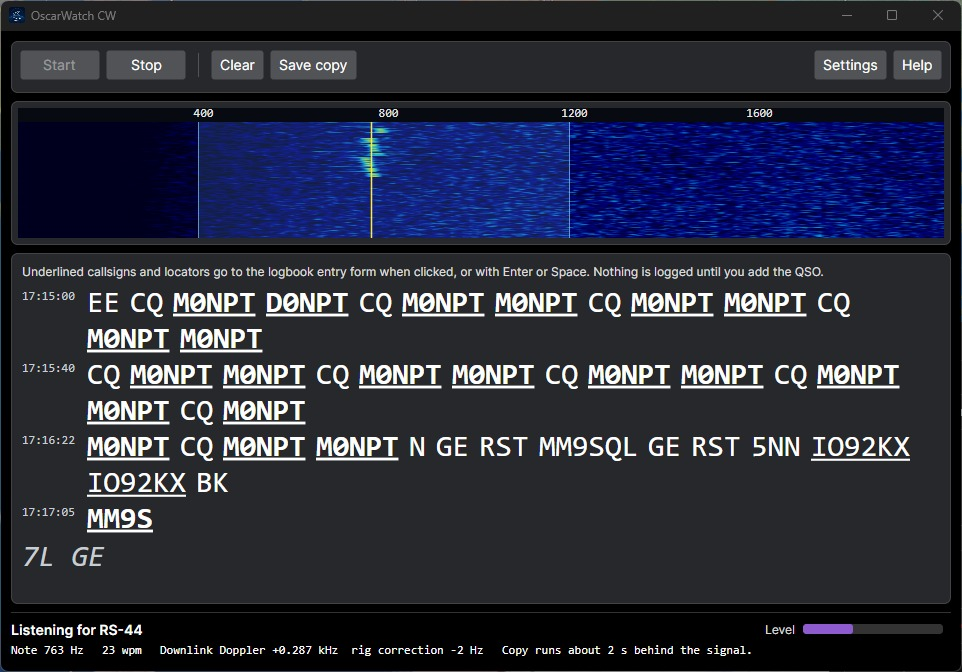
OscarWatch CW uses DeepCW, an AI model, to turn the Morse from your radio into text, and it can key the radio to send as well. It is built into OscarWatch Tracker, under Tools. A callsign in the copy can go straight into the logbook.
Who it is for
Operators who work CW through a linear satellite and want the Morse written down as it arrives. You still tune the radio. OscarWatch reads the note and, when you are ready to answer, sends the message you choose.
The decoder
Tools, then OscarWatch CW. The window listens. It does not key the radio.
Click the trace you want
The waterfall shows 0 to 2000 Hz. The decoder reads the shaded band, starting at 400 to 1200 Hz. Click another CW trace to read that one, or right-click to put the band back.
The note can drift
Follow the note is on by default, so Doppler does not walk the signal out of the band. On SSB, OscarWatch also shifts the audio to undo the steps your radio takes for Doppler. The radio is not retuned.
Stray letters are hidden
Words of one or two letters are left out when the decoder is unsure. Those are usually noise between overs. A short word it is sure about, such as K, stays.
Callsigns fill the logbook
Click an underlined callsign or locator, or press Enter or Space. It goes into the logbook entry. Your own callsign is not offered. The contact is saved only when you add it.
About 2 seconds behind
The newest letters can still change while a character is finishing. Each finished line keeps its UTC time, and you can save the whole copy as a text file.
Start as the satellite rises
With the window open and the frequency panel on CW, OscarWatch can start listening when the satellite climbs through an elevation you set, and stop when it sets. This is off until you tick it.
It runs on your computer
Decoding uses the DeepCW model by e04, under the MIT licence. No audio is sent anywhere.
The text can be larger
Set the decoded text from 10 to 40 points. In the window, hold Ctrl and turn the mouse wheel, or press Ctrl with plus or minus. Ctrl+0 returns to 16.
Sending from the logbook
The decoder does not transmit. The logbook can. Twelve buttons sit between the contact you are typing and the recent contacts, when the station mode is CW or reverse CW (CW-R).
- F1 CQ CQ SAT, then your callsign twice
- F2 Call Their callsign
- F3 Report Their callsign, the report you are sending, and your grid
- F4 My call Your callsign
- F5 Grid Your grid
- F6 TU Thank you, your callsign, and SK for the end of the contact
F7 to F12 start empty. You can change any message.
Click or press a key
Click a button, or press F1 to F12 while the logbook window is active. The button that is sending turns red. Press another button to stop the current message and send the new one.
Callsign and report filled in
A message can include your callsign and grid from the logbook, and their callsign, report, grid and name from the entry row. Type those before you send a message that uses them.
5 to 60 words a minute
The WPM box next to Stop sets the speed. OscarWatch uses standard PARIS timing, and the next message uses the new speed. On an Icom, speeds outside 6 to 48 words a minute are sent at the nearest limit.
Stop the message
Press Esc or Stop to abort straight away. On a Kenwood, Stop also clears the radio's CW buffer.
Kenwood and Icom key themselves
The TS-2000, TS-590S, TS-590SG, TS-890S, TS-990S, IC-9700, IC-705, IC-7300, IC-7100 and IC-905 form the Morse from text sent over the CAT lead. No keying cable is needed. Put the radio in CW with break-in on.
A COM port line for other radios
OscarWatch keys DTR or RTS and times every dot and dash. Connect that line to the radio's key socket through a keying interface, and turn break-in on.
Buttons show only on CW
Switch the focused satellite to a CW mode, or choose Voice / CW on the frequency panel. The row stays hidden on FM, SSB and the digital modes.
Listen while you transmit
Satellite CW is full duplex, so you can hear your own downlink while a message is sending. If your signal is off frequency, adjust the TX offset.
RX and TX offsetsOn a Yaesu FT-991, FT-991A or FTX-1, RTS on the CAT port is used for flow control. Key CW with DTR, or with a separate COM port.
Start a CW pass
- 1 Download and install OscarWatch Tracker. It is free.
- 2 Connect the radio audio, then open Tools and choose OscarWatch CW. In Settings, pick the input.
- 3 Put the frequency panel on CW and press Start. Click a callsign in the copy to fill the logbook.
- 4 To send, open the logbook settings, tick Show the CW keyer, and press F1 to F12 during the pass.