
OscarWatch FT8
FT8 through linear satellites, without the juggling.
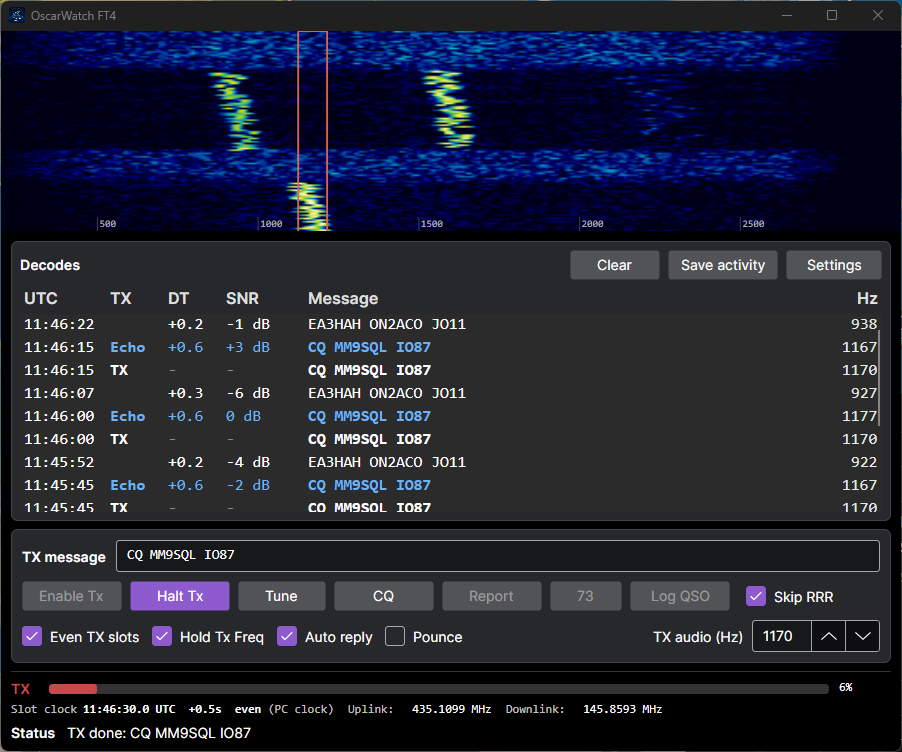
OscarWatch FT8 is the same modem window as OscarWatch FT4, running 15 second slots. It listens, sends, keys your radio and keeps you on frequency through the pass. QO-100 is the satellite most people use. Any other linear satellite with an FT8 transponder works the same way. Open it from Tools. There is no WSJT-X to install.
Who is it for?
Satellite operators who want FT8 contacts without running WSJT-X and a separate Doppler tool at the same time. Most people start on QO-100. Any other linear satellite with an FT8 transponder works the same way, including a custom one you add yourself.
Built for the pass
Audio, PTT, callsign and logbook settings are shared with FT4. You set them once. The slots are 15 seconds, and finished contacts are logged as FT8.
15 second slots
FT8 exchanges take about twice as long as FT4. One exchange is 30 seconds. From the first call to 73 is usually about two minutes.
Doppler that respects the slot
The radio is retuned at each 15 second slot boundary, and any drift inside the slot is corrected in the audio. Your signal stays put while you transmit.
Echo calibration
OscarWatch FT8 decodes your own signal coming back from the satellite and nudges your transmit frequency until the echo lands where you meant. That correction is remembered for the FT8 transponder, separate from any FT4 correction on the same satellite.
Auto-sequence
Click a station to answer, or press CQ. The exchange runs itself from call to 73, so a short pass still gets you a complete contact.
Straight into your logbook
Finished contacts save automatically as FT8 to the OscarWatch Logbook, queue for Cloudlog if you use it, and go out over Satellite link to your other apps.
PTT your way
Key the radio with VOX, CAT, RTS or DTR, a separate COM port, or manually. Whatever your station uses, it fits.
Kind to the transponder
A 30 W limit is enforced on supported radios, and transmitting is blocked on FO-29, AO-7 and FM satellites.
Accurate slot timing
FT8 needs your clock to be right. OscarWatch can take its time from GPS, which is handy when you operate portable. The setting still says FT4; it times FT8 slots as well.
See who heard you
Connect OscarWatch Tracker to a free OscarWatch account and OscarWatch FT8 can send the stations it hears to OscarWatch.org, with the satellite name, stored as FT8. Everyone can see who is active, which grids are on the air, and who heard whom on each pass. Reporting to PSK Reporter is available too.
Get on the air
Finding your own signal is the part that eats a pass, same as on FT4. The traces and the echo look the same; each slot is 15 seconds instead of 7.5. This short video shows how to find your signal, then finish a contact.
- 1 Download and install OscarWatch Tracker. It is free.
- 2 Connect your radio, then open Tools and choose OscarWatch FT8.
- 3 Pick a satellite with an FT8 transponder. QO-100 is the usual starting point. Set how your radio is switched to transmit.
- 4 Wait for the pass, then press CQ or click a station to answer.